

Barcode Enhancing Business Efficiency and Traceability
In the fast-paced world of modern commerce, efficiency, accuracy, and traceability are more important than ever. Businesses today manage vast amounts of inventory and data, and manual processes are no longer sufficient to meet these demands. Barcode generation and printing have emerged as fundamental tools in automating and optimizing operations across industries including retail, manufacturing, healthcare, logistics, and warehousing.
This article explores the importance of barcode technology, the process of generating and printing barcodes, its benefits, types, tools involved, and best practices to implement it in business workflows.
What is a Barcode?
A barcode is a method of representing data in a visual, machine-readable form. Barcodes consist of parallel lines (1D) or patterns (2D like QR codes) that can be scanned by machines such as barcode scanners or mobile apps. Each barcode represents specific information like product ID, batch number, expiry date, or location code.
Barcodes play a key role in identification, data capture, and inventory tracking. They help businesses monitor product movement, sales, deliveries, and even customer behavior in real-time.
The Process of Barcode Generation
Barcode generation refers to the creation of these codes using specialized software. The process typically involves:
- Selecting the Barcode Type: Different industries use different types of barcodes. Common types include:
- UPC (Universal Product Code): Widely used in retail.
- EAN (European Article Number): Similar to UPC, used globally.
- Code 39 and Code 128: Used in logistics and manufacturing.
- QR Codes: Two-dimensional barcodes often used in marketing, websites, and payments.
- DataMatrix and PDF417: Used for large data storage, common in pharmaceuticals and defense.
- Inputting the Data: The information to be encoded, such as SKU, serial number, or location, is entered manually or pulled from a database.
- Customizing the Barcode: Businesses can set parameters like size, resolution (DPI), encoding, and human-readable text below the code.
- Generating the Code: Software like Zebra Designer, Bartender, NiceLabel, or open-source tools like Zint Barcode Studio can create barcodes in image formats (PNG, JPG, SVG, etc.) or PDF for printing.
Barcode Printing: Tools and Technologies
Once the barcode is generated, it needs to be printed on product packaging, labels, or documents. The quality of printing directly affects scan accuracy. Barcode printing involves:
1. Barcode Printers
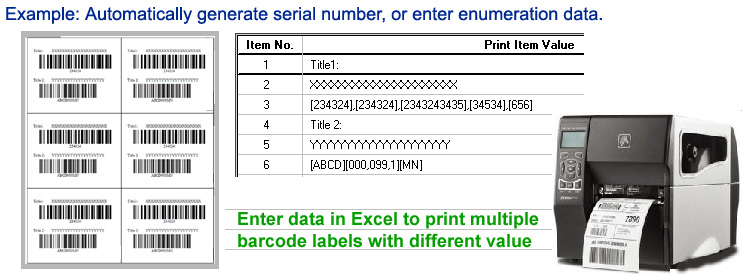
- Thermal Printers are the most popular choice:
- Direct Thermal (DT): Heat-sensitive paper, used for short-term labels like shipping.
- Thermal Transfer (TT): Uses ribbon and durable labels, suitable for product and asset labeling.
- Laser Printers: Used for high-volume printing on sheets.
- Inkjet Printers: Less common for barcodes due to lower scan accuracy.
2. Labels and Tags
Barcodes can be printed on:
- Adhesive labels
- Hang tags
- Packaging
- Wristbands (for hospitals or events)
Choosing the right label material (paper, polyester, vinyl) depends on usage conditions like temperature, moisture, and lifespan.
3. Printing Software
- Label Design Software: Tools like BarTender by Seagull Scientific, NiceLabel, or TSC Console help design and print labels with barcodes, text, logos, and variable data.
- Integration with ERP: Barcode printing can be automated within ERP systems like SAP, Microsoft Dynamics, or custom .NET/Java applications.
Benefits of Barcode Generation and Printing
Barcode technology provides numerous advantages for businesses of all sizes:
1. Improved Accuracy
Manual data entry is prone to errors. Scanning barcodes drastically reduces mistakes in inventory management, billing, and shipping.
2. Time Savings
Barcodes allow for instant product identification and data entry, speeding up transactions, inventory audits, and supply chain operations.
3. Better Inventory Control
With barcoded products, real-time tracking of stock becomes easy. It enhances visibility across warehouses, preventing overstocking or stockouts.
4. Enhanced Traceability
Barcodes help trace the product journey from manufacturing to final sale. This is crucial for industries like food, pharmaceuticals, and automotive, where batch or lot tracking is legally required.
5. Cost Efficiency
Barcode systems are affordable to implement and reduce labor costs by automating repetitive tasks.
6. Integration with Systems
Barcodes work seamlessly with inventory software, point-of-sale (POS) systems, and warehouse management solutions (WMS), enabling automation.
Applications Across Industries
Retail
Barcodes are used to label products, manage stock, speed up checkout at POS terminals, and conduct stocktaking.
Manufacturing
Barcodes help track raw materials, monitor production lines, manage parts, and control quality.
Logistics and Warehousing
They are vital for managing inbound/outbound shipments, storing items correctly, and tracking parcels in transit.
Healthcare
Patient wristbands, medicine labels, and lab samples are all barcoded for safety, tracking, and compliance.
Libraries and Education
Books, student ID cards, and laboratory equipment can be tagged for streamlined check-in/out and asset tracking.
Types of Barcodes at a Glance
| Barcode Type | Description | Use Case |
|---|---|---|
| UPC | 12-digit barcode | Retail product labeling |
| EAN | 13-digit barcode | International product labeling |
| Code 39 | Alphanumeric | Inventory, badges |
| Code 128 | Compact alphanumeric | Shipping, logistics |
| QR Code | 2D matrix code | URLs, marketing, contactless access |
| Data Matrix | High-density 2D code | Healthcare, aerospace |
Best Practices for Barcode Implementation
- Choose the Right Barcode Type: Match the barcode to your business needs (e.g., QR for mobile marketing, Code 128 for logistics).
- Ensure Print Quality: Poor print quality can lead to scanning failures. Use high-resolution printers and test regularly.
- Standardize Label Formats: Consistency in layout, barcode position, and label size improves efficiency.
- Train Employees: Staff should know how to generate, print, and scan barcodes correctly.
- Integrate with Business Systems: Automate data exchange between barcode scanners, label printers, and ERP/inventory systems.
- Test and Validate: Periodically test barcode labels for readability and durability under different conditions.
Future Trends in Barcode Technology
As businesses go digital, barcode technology continues to evolve:
- RFID Integration: Combining barcodes with RFID allows touchless scanning and real-time tracking.
- Mobile Barcode Scanning: Smartphones can now scan and generate QR codes, enabling flexible use in customer interactions.
- Cloud-based Labeling: Businesses can generate and print barcodes from the cloud, allowing centralized control and scalability.
- Blockchain Traceability: Barcodes linked with blockchain can help verify product authenticity and supply chain transparency.
Conclusion
Barcode generation and printing are not just tools—they are strategic enablers of automation, accuracy, and growth. From retail stores to hospitals and warehouses to factories, barcodes empower businesses to manage operations more effectively.
By implementing the right barcode system—choosing the correct barcode type, using quality printers and labels, and integrating with software—organizations can gain complete visibility, reduce errors, and improve productivity.
Whether you’re a small business looking to streamline inventory or a large enterprise managing a complex supply chain, barcode technology offers a scalable, cost-effective solution to stay competitive in today’s digital age.
One response to “Barcode Generation and Printing”
[…] Barcode generation and printing […]